Software Guide2 min read

Data Visualizations

This document describes data visualization methods for mouse behavioral tracking analysis, including 2D density heatmaps of spatial position, trajectory paths, cumulative distance plots for individual body parts, and violin plots showing distance distributions between body part pairs.

Updated Feb 7, 2026
1 sections

Get This Product

ConductVision: AI Driven Video Tracking

ConductVision: AI Driven Video Tracking

Request a Quote

Get Quote
Video Tracking Cameras

Video Tracking Cameras

Request a Quote

Get Quote

Related Accessories

Also Available on Amazon

As an Amazon Associate, ConductScience earns from qualifying purchases.

Data Visualizations

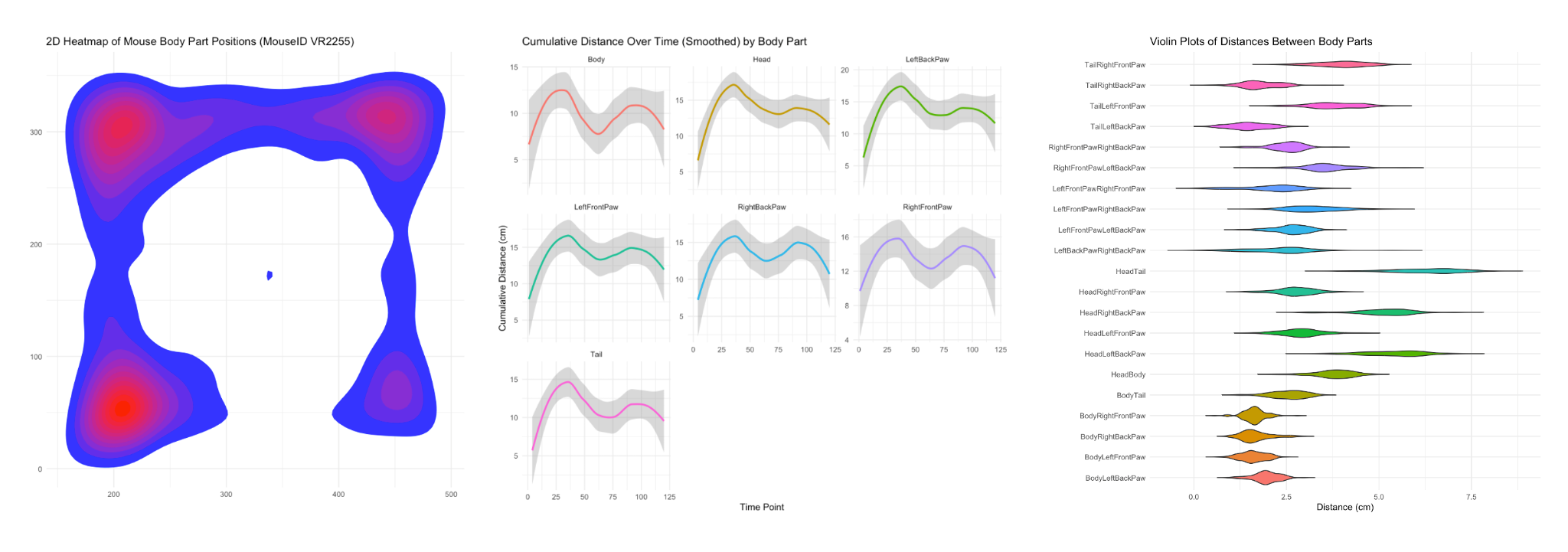
2D Density Heatmap representations of Mouse Position

Spatial heatmap of mouse position across all frames

  • X and Y axes are position in the open field (units in pixels)
  • The X and Y positions for each body part across each frame were used to determine mouse position across time
  • Contours in the plot (i.e., the concentric polygons) represent the frequency with which the coordinate values are represented in the dataset
  • The contours are filled with a color gradient, which represents the density levels: coordinates with the lowest value density are blue, highest density values are red

Mouse Trajectory
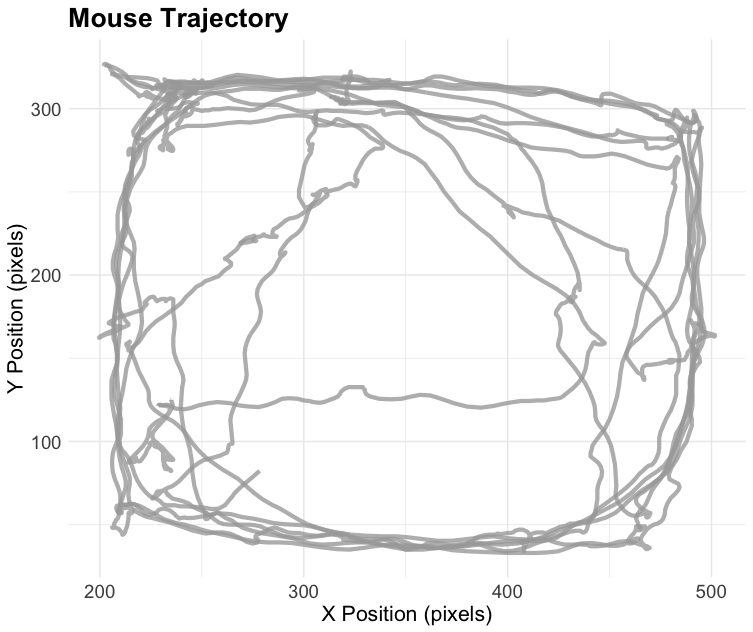
Path of mouse across time

  • X and Y axes are open field coordinates (units in pixels)
  • Used XBody and YBody to represent the mouse position (omitted zeros)
  • Smoothed the data by applying a rolling mean across every 3 frames to reduce noise

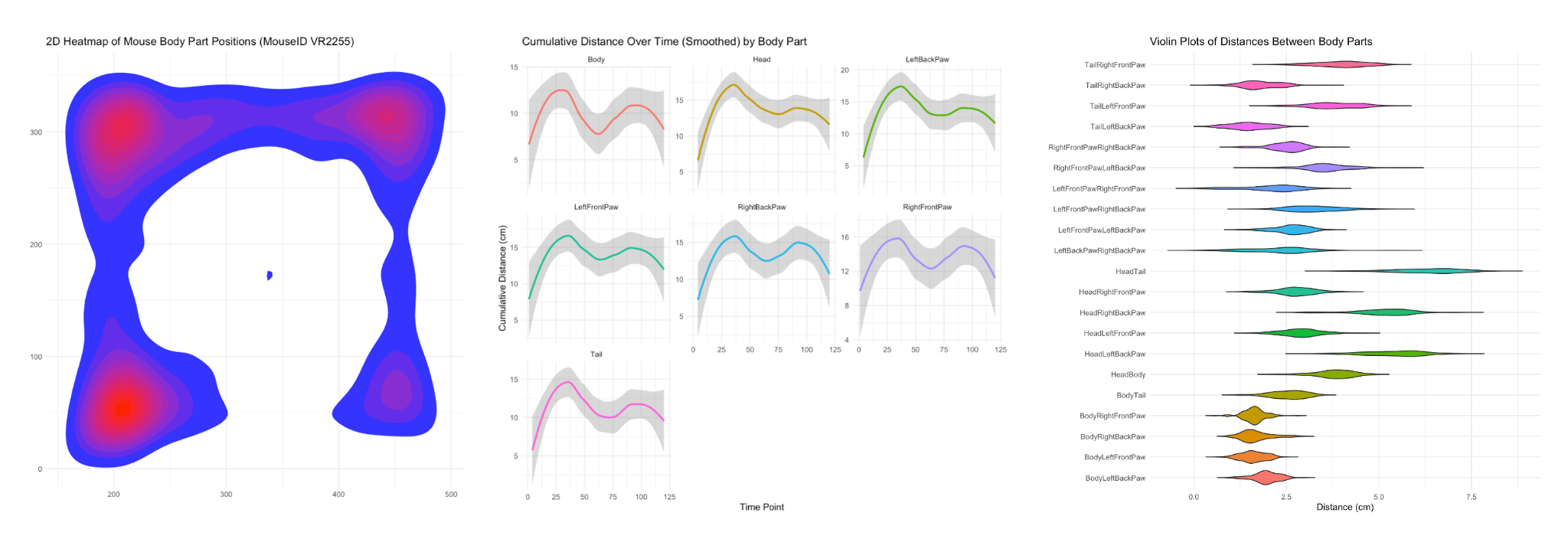
Cumulative Distance over time for each body part

Faceted grid of line plots for each tracked body part across time

  • Cumulative distance for each body part is represented by a line with LOESS smoothing (omitted zeros)
  • Shading represents 95% confidence interval
  • Each plot has the same Y axis (easy comparison)
  • No legend (legends are redundant in faceted grids)

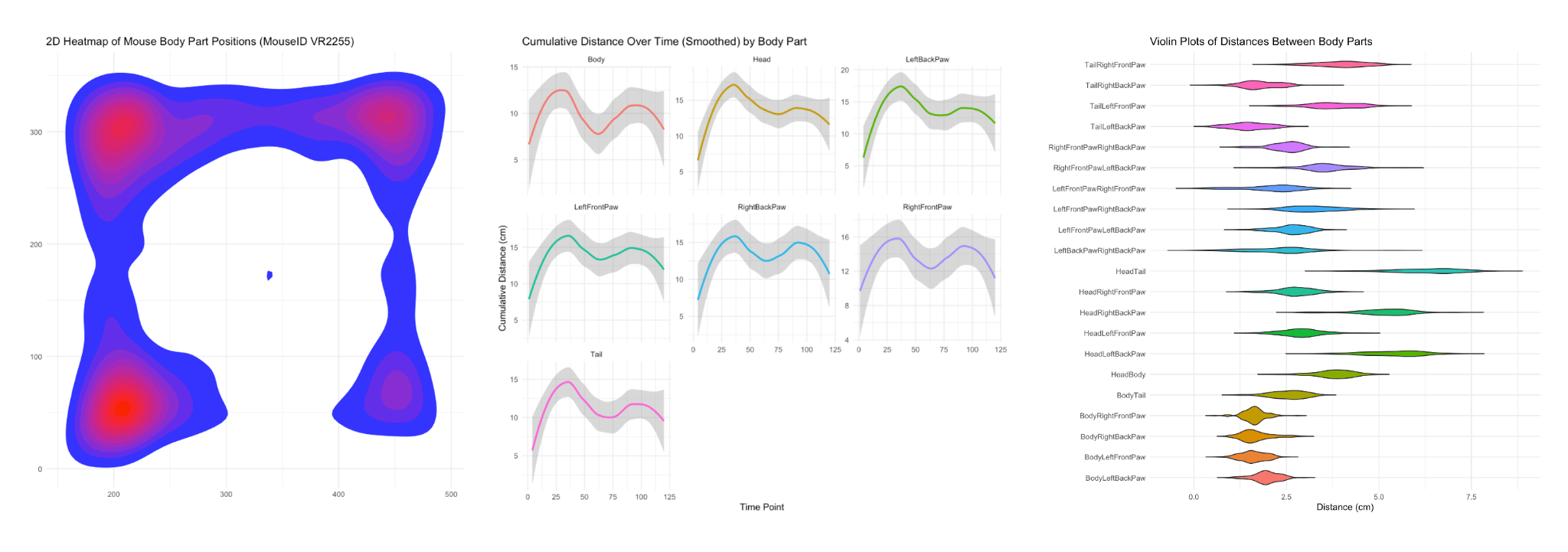
Distance between body parts

Violin plot visualizes the distribution of distances between various pairs of body parts (units in centimeters)

  • Each violin corresponds to a different body part pair, and is essentially a histogram superimposed on a box and whiskers plot (though omitting the box & whiskers)
    • X axis labeling should be cleaner (e.g., "Body - Tail" instead of BodyTail)
  • Different color for each violin (rainbow gradient like shown here works well)

Was this article helpful?

Related Articles

Conduct Vision Software Manual

ConductVision Software Manual Contents 1\. Install and Run Application 7

Conduct Vision Fear Conditioning Software Manual

This manual provides instructions for installing, configuring, and operating the ConductVision Fear Conditioning Software, which is used to conduct fear conditioning experiments with video tracking capabilities on rodents. The document covers software installation, experiment setup, stimulus protocol configuration, video tracking, hardware adapter integration, data export, and troubleshooting procedures.

Camera Manual

This manual provides instructions for the Conduct Vision Camera, including connection to a PC, use of compatible video recording software, mounting options via a camera holder, and operation through the built-in Camera app on Microsoft Windows devices.

Camera Specification

This document specifies the technical parameters for two Conduct Vision infrared HD camera models: a Standard model with 2-megapixel resolution and 30 fps capability, and an Advanced model with 5-megapixel resolution and 60 fps capability. Both cameras feature CMOS sensors, multiple field-of-view options, and MJPG format output via USB interfaces.

ConductVision Specification

ConductVision is an AI-based animal behavior tracking software that operates at 30+ frames per second and uses machine learning to detect multiple body points for tracking various animal subjects including mice, rats, ferrets, zebrafish, and Drosophila. This specification document outlines the software's key features, advantages, and hardware requirements for computer and camera systems.

Need more help?

Our support team is here to assist you